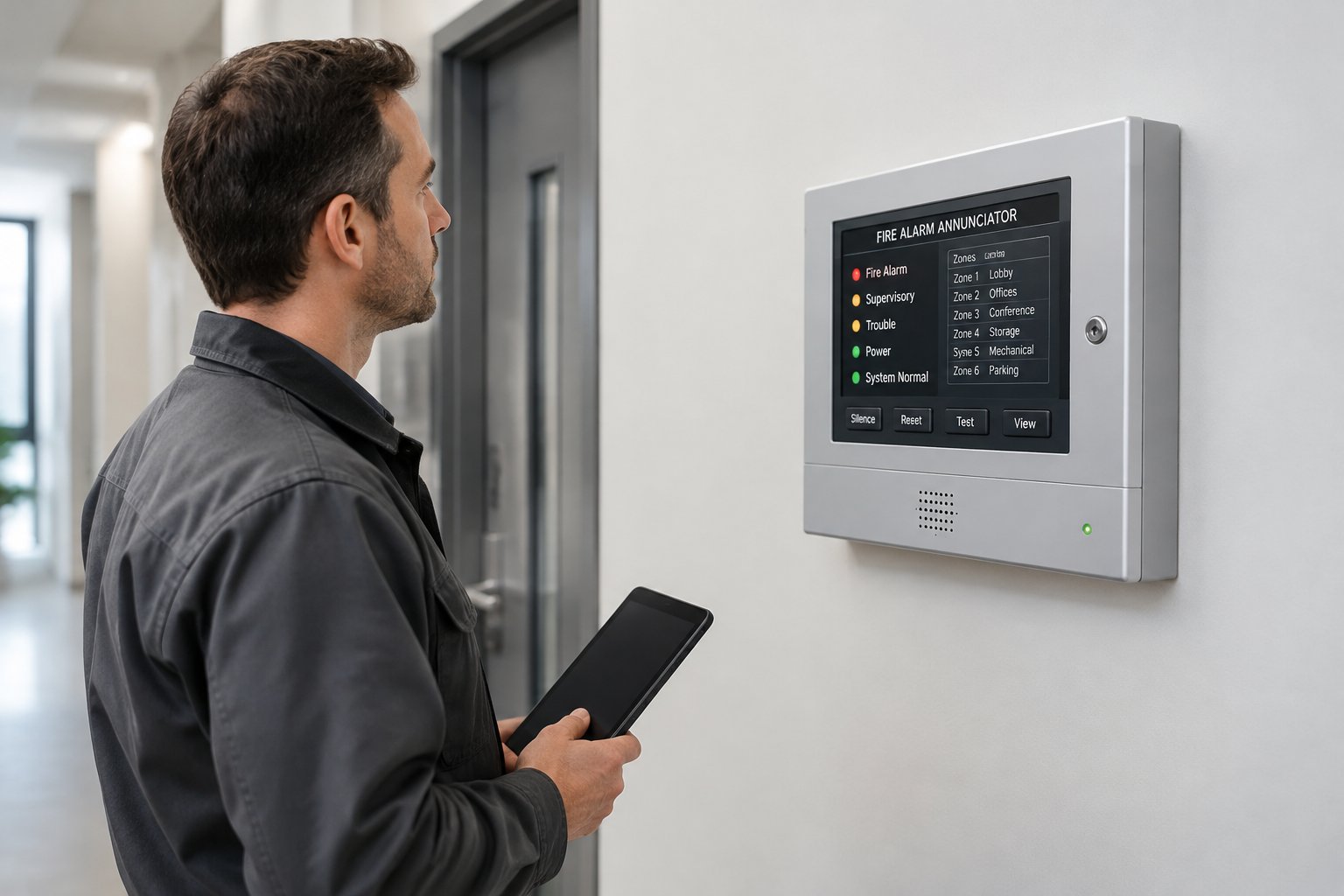
A remote annunciator is a small display panel that repeats your fire alarm system's status somewhere other than the main control panel, usually at the entrance the fire department uses. It shows whether the system is in alarm, supervisory or trouble and points to where the event started. On some systems it also carries a few approved controls, such as acknowledge or silence.
The reason it exists is simple. Your fire alarm control panel (FACP) often lives in an electrical room, a riser closet or the back of a warehouse. Firefighters walking in the front door need to know which floor or wing to head for before they start searching, and the annunciator gives them that answer at the door.
What a Remote Annunciator Displays
An annunciator does not detect anything on its own. It mirrors what the main panel knows and presents it in a form a firefighter can read in a few seconds.
The three signal types
Every annunciator separates events into the same three categories as the main panel, each with its own indicator:
- Alarm: a smoke detector, heat detector, pull station or sprinkler waterflow switch has activated. This is the event crews are there for.
- Supervisory: a fire protection system is off normal, such as a closed sprinkler valve or a fire pump condition. Not a fire, but it can affect how crews fight one.
- Trouble: the fire alarm system itself has a fault, such as a broken circuit, lost AC power or a low battery.
Most units also show AC power status and whether alarms have been silenced. That last item matters, because a silenced panel in a building with a real fire can mislead anyone who walks in later.
LCD text vs. LED zone displays
Annunciators come in two broad styles. LCD models show text, often the same message that appears on the main panel, such as "SMOKE DETECTOR 3RD FLOOR ELEC RM." On an addressable fire alarm system, that text can point to a single device, which saves a lot of time in a large building.
LED models use a grid of lights, one per zone, with a printed label next to each. They are common on older conventional systems and on graphic annunciators that show a floor plan with lit zones. Their usefulness depends entirely on the labels. "Zone 4" helps nobody at 2 a.m., but "Zone 4, Building B Second Floor East" does.
What It Controls (and What It Does Not)
Some annunciators are display only. Others include common controls: acknowledge, alarm silence, system reset and sometimes a lamp test or drill function. Which buttons are active depends on the panel model, its programming and what your local fire department wants available at the door.
Many fire officials want firefighters to be able to silence the alarm from the entrance while they investigate, so they can communicate without shouting over horns. Others prefer display only and want all controls at the main panel. Units with controls typically use a key switch so building occupants cannot press buttons. Settle this question with the Authority Having Jurisdiction (AHJ) during plan review, not after installation.
Remote Annunciator vs. the Main Fire Alarm Control Panel
The FACP is the brain of the system. It supervises every circuit, decides when to sound the notification appliances, runs functions like elevator recall and door releases, and sends signals to the monitoring center. Our guide to the fire alarm system control panel covers that role in more detail.
The annunciator is a window into the FACP, connected over a supervised data circuit. It makes no decisions. If an annunciator fails, the system still detects fire, sounds the alarm and calls for help; the panel simply reports a trouble for the lost annunciator. If the FACP fails, nothing works. A single system can support several annunciators, for example one at the front lobby, one at a loading dock entrance used by the fire department and one at a security desk.
Why an entrance display does not replace monitoring
An annunciator only helps someone standing in front of it. In an empty building at night, it does nothing to get the fire department moving. That is the job of 24/7 fire alarm monitoring. Monitoring brings crews to the building, and the annunciator tells them where to go once they arrive.
When Is a Remote Annunciator Required?
NFPA 72 requires that annunciation be readily accessible to responding personnel and located as required by the AHJ. The International Fire Code, NFPA 101 and the building code also call for annunciation in certain situations, such as high-rise buildings and sprinkler monitoring systems. In everyday practice, the question usually comes down to one thing: is the main panel at the entrance where firefighters will walk in?
Typical situations that call for one
Fire officials commonly ask for an entrance annunciator when:
- The FACP sits in a back room, basement, upper floor or locked IT or electrical space.
- The building is large enough or has enough wings that crews would lose time hunting for the source.
- The site is a campus or multi-building property served by one panel.
- The building has more than one likely fire department entrance, such as a front lobby and a rear dock.
- A renovation or tenant build-out has moved the panel away from the front door.
A small retail space with the panel just inside the front door may not need one. A mid-rise office, large warehouse, school, hospital or apartment community usually does. High-rise buildings typically have a fire command center that takes this role further, with annunciation alongside other firefighter controls.
Who decides in Houston and Harris County
The local AHJ has the final word on whether you need an annunciator and where it goes. In the City of Houston, that is the Houston Fire Department's Fire Marshal's Office. In unincorporated Harris County, the Harris County Fire Marshal's Office reviews fire alarm plans, and cities like Sugar Land, Pearland, Conroe and League City have their own fire marshals. Placement is shown on the fire alarm drawings and settled during plan review. Many departments like to see the annunciator close to the Knox Box so crews find both in one stop.
Getting this right on paper saves change orders later. Alarm Masters' licensed designers lay out annunciator locations as part of a complete fire alarm design and installation project, so the location, controls and wiring are approved before the walls close.
Installation Details That Matter
A few practical points decide whether an annunciator helps responders or frustrates them.
Compatibility with your panel
Annunciators are made to work with specific panel families. A unit from one manufacturer rarely talks to another's panel, so the panel model and its available annunciator ports or data loop capacity come first. Older panels may have limited options, which is one of the things a technician checks before quoting an add-on.
Location, visibility and glare
Mount the unit at the approved entrance where it can be seen and reached without unlocking anything. Glass lobbies are common across Houston office parks, and afternoon sun glare can wash out an LCD screen. A shaded wall position or the right display type avoids that problem.
Wiring and power
The data circuit between the panel and the annunciator must be supervised, so a cut cable shows up as a trouble. Power comes from the panel or a supervised power supply, and the standby battery calculation has to include the annunciator's load. That matters during hurricane season, when long utility outages put batteries to work.
Labels that match the building
Every zone label and device description should match what a firefighter will see on the door signs. After renovations, labels often lag behind the floor plan. Confirming the text during each annual inspection keeps the annunciator from sending crews to a room that no longer exists.
Get an Entrance Display That Speeds Up Every Response
The goal is an annunciator that tells crews exactly where to go the moment they open your front door. Alarm Masters has designed and installed fire alarm systems in Greater Houston since 1990, and our licensed team can match the right annunciator to your panel and handle the AHJ coordination. Call 281-933-3900 or request a free estimate.
Frequently Asked Questions
Can I add a remote annunciator to an existing fire alarm system?
Usually, yes, as long as the panel supports a compatible model and has capacity on its annunciator bus or data loop. A technician also checks battery capacity for the added load. Adding one is a system modification, so expect updated drawings and possibly AHJ review.
Can a remote annunciator be mounted outside?
Most annunciators are listed for indoor use only. Many fire officials prefer a spot just inside the first entrance door or in a vestibule, where crews can read it without the unit facing rain and heat. If an outdoor location is required, the unit or its enclosure has to be listed for that environment.
What does it mean when the annunciator says "communication fault"?
The annunciator has lost its data connection to the main panel. The panel will show a trouble for it too. Common causes are a damaged cable, a loose connection or a failed unit, and it should be repaired promptly so responders are not left with a blank or stale display.
Is a graphic annunciator better than an LCD annunciator?
A graphic annunciator shows a building map with lit zones, which helps on sprawling campuses or complex floor plans. An LCD unit gives precise device text, which suits addressable systems. Some sites use both. Your AHJ may have a preference for larger properties.
Do apartment complexes need remote annunciators?
Many do, especially garden-style communities with several buildings on one fire alarm system or mid-rise buildings where the panel sits in a back room. Fire officials often want an annunciator at the leasing office or main entrance so crews can see which building is in alarm.