.svg)
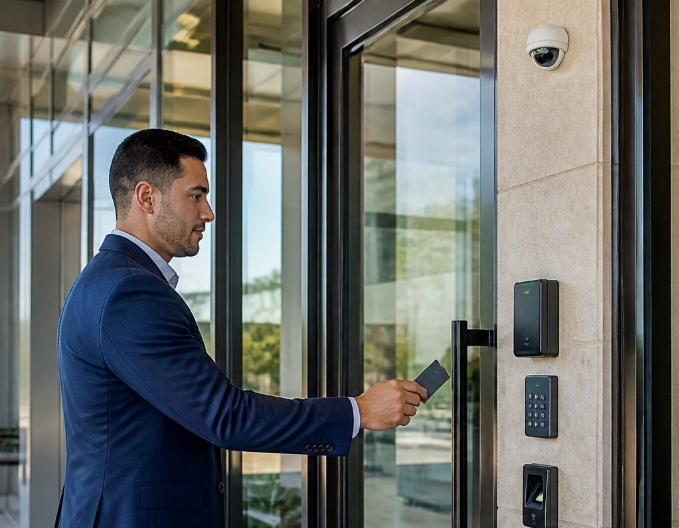
Every business owner locks up at night and hopes that's enough. But a lost key, a copied fob, or an employee who never turned in their badge can quickly undo that hope. Unauthorized entry through a single unaccounted-for key can lead to theft, property damage, or worse, and once it happens, proving what went wrong becomes a guessing game.
This is where a door access control system changes the equation. Instead of physical keys and traditional locks, you get digital credentials, activity logs, and the ability to shut off access in seconds.
In this guide, you'll discover how these systems work, the credential types available, the hardware behind each door, and how to match a setup to your building. Keep reading for practical, Texas-grounded advice you can use before you ever request a quote.
How Electronic Entry Decisions Work
Every time someone badges in, a door access control system runs a fast decision behind the scenes, checking who they are and whether they're allowed in right now.
Electronic access control replaces the mechanical trust of a key with a digital process. A card reader captures your credential, sends it to a controller, and the controller decides whether to send an unlock signal. This happens in under a second, and it happens the same way every single time, day or night.
Door access control works because it separates identity from permission. Knowing who someone is doesn't automatically mean they should get in. The system checks both pieces before the door ever opens.
From Credential to Unlock Signal
A credential, like a fob or mobile app, gets presented to a reader mounted near the door. The reader converts that signal into data the controller can check against a stored list of access permissions.
If the credential matches an active user with the right permissions, the controller sends power to the lock and the door releases. If it doesn't match, or the schedule says access is not allowed at that hour, the door stays locked, and the attempt gets recorded.
Authentication, Authorization, and Access Schedules
Authentication confirms who is presenting the credential. Authorization confirms what that person can do once identified. These are two separate checks, and both matter.
Access schedules add a time layer on top of authorization. A cleaning crew might have access only between 6 p.m. and 8 p.m., while a manager has 24-hour access to every door.
What Access Logs Record
Access logs, also called activity logs or audit logs, create a running record of every entry attempt across your building. This record is your audit trail if you ever need to investigate an incident.
- Who used a credential and at what door
- The exact date and time of entry or denial
- Whether the attempt succeeded or failed
- Which schedule or permission rule applied
These logs turn a locked door into real evidence, not just a barrier. That evidence becomes even more useful once you know which credential type generated it, which is exactly what comes next.
The Main Credentials and Entry Methods
Houston-area businesses now choose from four main ways to open a controlled door, and each one fits a different risk level and daily workflow.
Access credentials range from simple physical cards to biometric identifiers tied to a person's body. Picking the wrong one for a given door either frustrates staff with too much friction or leaves a sensitive area under-protected. Matching credential type to risk level is one of the most practical decisions you'll make.
RFID Cards and Key Fob Systems
RFID cards and key fobs use radio frequency identification, a short-range wireless signal, to communicate with a reader. Smart cards and key fob systems remain the most common credential in Texas offices and warehouses because they're affordable and easy to issue.
The tradeoff is that a lost or copied card creates the same unauthorized entry risk you were trying to solve. Deactivating a lost fob in your software takes seconds, which is the real advantage over rekeying a physical lock.
PIN Codes and Keypad Readers
PIN codes typed into keypad readers remove the need for a physical item entirely. Staff just remember a number, which works well for smaller teams or secondary doors.
The weakness is that a PIN can be shared or watched over someone's shoulder. Keypads work best paired with a card or fob for higher-security doors, a setup called two-factor entry.
Mobile Credentials on a Phone
Mobile access control turns a smartphone into the credential using Bluetooth or NFC (near-field communication, a short-range wireless connection). Digital credentials on a phone are easy to issue and just as easy to revoke remotely.
Most employees carry their phones everywhere, so mobile access control significantly reduces lost credentials. It also lets you send temporary access without ever handing over hardware.
Biometric Entry for Higher-Risk Areas
Biometric authentication checks something unique to the person, like a fingerprint scan or facial recognition, instead of something they carry. Biometric access control fits server rooms, pharmacies, or cash-handling areas where the risk of a shared or stolen credential is too high to accept.
This method offers the strongest identity match available today. Once you know which credential fits which door, the next question is what hardware makes that door actually work.
What Each Controlled Door Needs
A single controlled door needs more equipment than most owners expect, and skipping a piece usually shows up later as a problem, not at installation.
An access control setup depends on a reader, a lock mechanism, a controller, and backup power working together at every door. Missing any one of these pieces either breaks the system or creates a safety issue during a power outage or fire event.
Readers, Controllers, and Secure Communications
The reader captures the credential, and the controller makes the access decision using stored access permissions. These two devices communicate using a protocol, a shared technical language, and OSDP (Open Supervised Device Protocol) has become a common open standard for secure communication between them.
HID and other manufacturers now support OSDP because it encrypts the signal between the reader and controller. This matters because older communication protocols could be intercepted more easily by someone with the right equipment.
Locks, Strikes, and Door Sensors
Door hardware options include electric strikes, electrified locks, and magnetic locks (maglocks), each suited to different door types. Smart locks combine the lock mechanism with built-in credential reading for a simpler installation on some doors.
Door sensors track whether a door is open, closed, or propped, feeding that status into your access logs. A propped door defeats the system's purpose, so sensors let your team catch it immediately.
- Electric strikes work well on standard swinging doors with minimal modification
- Electromagnetic locks offer strong holding force for high-traffic commercial entries
- Smart locks suit retrofits where wiring a full controller isn't practical
Power, Battery Backup, and Safe Exit
Every electrified door needs a UPS (uninterruptible power supply) or battery backup so it keeps working during an outage. A request-to-exit device lets people leave freely from inside without a credential, supporting free egress.
Fire codes require that people can always exit a building without a key or code, even if the access control system loses power. This is a life-safety requirement, separate from your building's fire alarm compliance obligations, and it applies to every secured door in the path of egress.
An LED and buzzer on the reader give staff instant feedback on whether a door accepted or denied their credential. Getting the hardware right at each door sets up everything your management software needs to do next.
Management Features That Reduce Daily Risk
The software layer determines whether a door access control system saves your team hours every week or becomes another headache to manage. The right features cut daily risk without adding daily work.
Role-based access control (RBAC) assigns permissions by job title instead of by individual person, which speeds up onboarding and offboarding. Other models exist, including attribute-based access control (ABAC), discretionary access control (DAC), and mandatory access control (MAC), but RBAC covers most Texas small business needs.
Role-Based Rules and Temporary Access
A new hire automatically gets the same access as everyone in their role, with no manual setup for each door. Temporary credentials work well for contractors, vendors, or seasonal staff who need access only for a set period.
Cloud-Based Access Control and Remote Management
Cloud-based access control lets your team manage every door from a phone or laptop, without driving to the property. Remote management means you can lock down a building or revoke a terminated employee's access the moment you need to, from anywhere.
Visitor Management and Video Intercoms
A visitor management system logs guest check-ins and issues short-term credentials tied to a specific date and time. Pairing that with a video intercom or door entry system lets front-desk staff see and speak with a visitor before ever unlocking the door.
Connecting Access Events to Video and Alarms
Linking access events to your camera footage means every unlock ties to a recorded clip, not just a log entry. This connection between systems, along with scalability and regulatory compliance needs, shapes which platform makes sense for your building next.
Choosing a System That Fits Your Property
The right access control system depends far more on your building's layout than on any single brand or feature list. Matching protection levels to actual risk is where most buying decisions succeed or fail. This Commercial Access Control Systems Buyer's Guide walks through this decision in more depth if you're ready to compare options.
Not every door needs the same level of security. A front lobby might only need a basic card reader, while a server room or pharmacy storage area calls for biometric access control or two-factor entry.
Match Protection Levels to Each Door
Walk your property and rank each door by what's behind it. Cash, inventory, sensitive records, and mechanical rooms deserve stronger access permissions than a break room or supply closet.
Plan for Growth, Existing Doors, and Daily Workflows
Scalability matters if you plan to add locations or staff. A system that only supports a fixed number of doors or users will force a costly replacement down the road.
- Confirm the system can add doors and users without a full hardware swap
- Check whether existing door hardware can be retrofitted instead of replaced
- Ask how the software handles multiple buildings under one account
Questions to Ask Before You Request a Proposal
Before you call a vendor, clarify your priorities. Knowing your door count, risk areas, and growth plans lets a licensed installer design a system built around your building, not a generic template.
- How many doors need controlling right now, and how many might get added later?
- Does the reader and credential type fit how our staff and visitors already move through the building?
- What happens to access if the internet or power goes down?
- How does the system support remote management from a phone?
Once you've answered these questions honestly, you're ready to put a real plan on paper.
Frequently Asked Questions
What are the main types of door access control systems?
The main types include key card and fob systems, PIN keypads, mobile credentials on a smartphone, and biometric options like fingerprint or facial recognition. Most Texas businesses mix two or more types across different doors based on risk level.
How does a door access control system work for a home or office?
A reader checks a credential at the door, sends the data to a controller, and the controller decides whether to unlock based on stored permissions. The whole process takes less than a second and creates a log entry every time.
What access control system works best for a small business?
A cloud-based system with card or mobile credentials fits most small businesses because it's affordable and easy to manage remotely. Facilities with sensitive storage, like a pharmacy or server room, may add biometric access control on specific doors.
How much does it cost to install a door access control system?
Cost depends on door count, the lock hardware each door needs, and whether you choose cloud or on-premises software. A licensed installer can give you an accurate number after a site walk of your specific property.
Can we use key cards, keypads, mobile phones, or biometrics to unlock doors?
Yes, all four credential types can work on the same system, often on different doors depending on the risk level. Many Texas businesses pair a keypad with a card reader for two-factor entry on higher-security areas.
How do we choose the right door access control system for our building?
Start by ranking each door by what it protects, then match credential type and hardware to that risk level. Before requesting a proposal, consider growth plans, existing door hardware, and whether you need remote management.
Put a Clear Access Plan in Place
A written access plan turns a pile of good intentions into a system your team actually follows every day. Skipping this step is the most common reason access control systems underperform after installation.
Physical security works best when policy and hardware move together. Access control systems only reduce liability exposure if someone owns the process of updating permissions, reviewing audit trails, and managing lost credentials.
- Assign one person to own credential issuing and revoking
- Review audit trails monthly, not just after an incident
- Set a policy for visitor management and temporary access windows
- Confirm mobile credentials and remote management tools are actually being used
A plan like this protects your investment and keeps the system doing its job long after installation day.
Our team at Alarm Masters designs and installs access control systems for Texas businesses with this exact approach, building the plan alongside the hardware, not as an afterthought. Request a free estimate to get that process started.



.svg)


.svg)


