.svg)
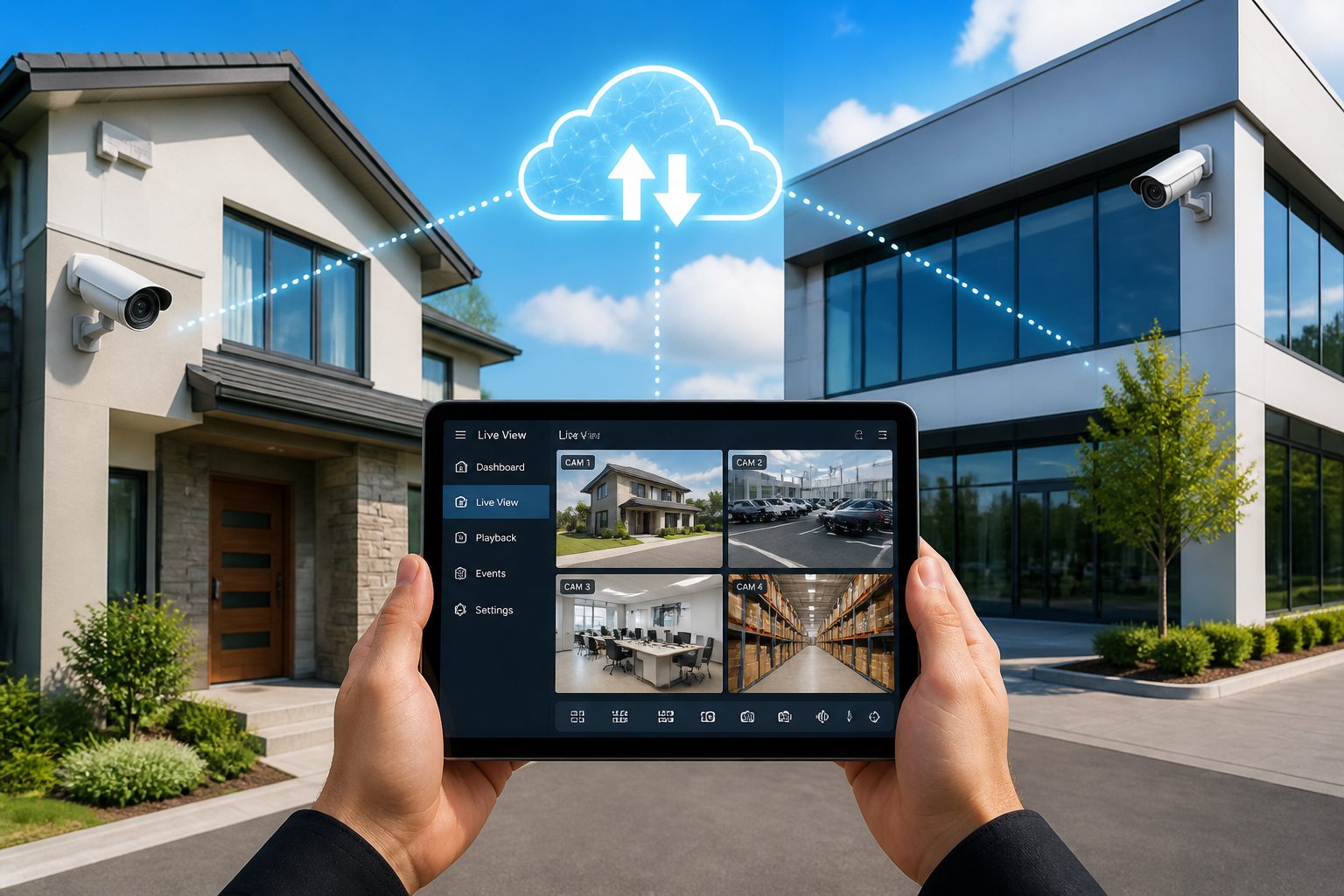
Cloud video surveillance stores your security camera footage on secure remote servers instead of a recorder sitting inside your home or business. That means you can pull up live or recorded video from your phone, tablet, or computer anywhere you have an internet connection. For a homeowner in Spring or a business owner juggling several locations across Houston, it also means your footage stays safe even if someone steals or damages the equipment on-site.
The core difference between cloud video surveillance and a traditional setup is straightforward: your video lives offsite, stays reachable from anywhere, and does not vanish when local hardware fails. Cloud systems are also easier to expand over time, simpler to load up with smart features, and manageable from a single dashboard.
This guide walks through how cloud-based video systems work, where they fit best, which features actually matter, and what to weigh before you choose one. Whether you are protecting a single home in The Woodlands or managing a handful of businesses across Texas, you will find practical guidance here.
It is easier to picture this on your own property with a little guidance. Our team designs cloud video surveillance systems that fit both homes and businesses across the Houston area, and we are always happy to walk you through the options in plain language.
How Cloud-Based Video Systems Work
Cloud video systems use your cameras to capture footage, compress it, and send it over your internet connection to secure offsite servers. A video management system, or VMS, then lets you view, search, and manage that footage from any device with a browser or app. In practice you need three things: cameras, a reliable internet connection, and a cloud platform that handles storage and access.
What Gets Stored In The Cloud
Your cameras can record continuously or only when they detect motion, and that footage uploads straight to cloud storage. Depending on your plan, you can keep short motion clips or full recordings, and most platforms let you set a retention period, which is simply how long footage is kept before the system deletes it.
Metadata such as timestamps, camera names, and motion events is stored alongside the video, which makes it far easier to jump to a specific moment later.
How Remote Access And Live Viewing Work
Remote viewing is a big part of why people choose cloud video in the first place. Once your cameras connect to the cloud VMS, you open an app or browser and watch live feeds from anywhere, with no need to be on the same local network. Most platforms also let you review recorded footage, bookmark clips, and share video with law enforcement or property managers. If you would rather have someone watching around the clock on your behalf, pairing your cameras with professional 24/7 monitoring adds a live layer of response on top of remote access.
You can also set permissions so only approved users see certain cameras or locations, which matters a great deal for businesses with several people on the team.
How Cloud And On-Site Recording Can Work Together
A hybrid cloud setup combines local and cloud recording. Your cameras record to a local device such as a network video recorder (NVR) while also uploading footage to the cloud. If your internet goes down, the local recorder keeps capturing video, and once the connection returns, the system syncs that footage back up to the cloud.
This approach is common with Houston-area businesses that want both on-site reliability and remote access. It also helps manage internet usage, since not every frame has to upload in real time.
When This Setup Makes Sense
Cloud video surveillance scales from a single home camera to a network spread across dozens of sites. The payoff is the same at every size: reliable access, offsite protection, and easy management without a physical recorder to babysit.
Single-Site Homes And Small Businesses
If you own a home in Spring or run a small office in Houston, cloud video keeps things refreshingly simple. There is no server room to build and no IT staff to hire. A few cameras on a cloud platform give you 24/7 visibility, motion alerts, and footage that stays safe even if the equipment itself is stolen.
For a home, this really shines when you travel or want to check on deliveries and activity around the property while you are out.
Multi-Location Properties And Growing Companies
Businesses with several locations in Houston or across Texas benefit most from centralized cloud video. Instead of logging into a separate system at each site, you manage every camera from one dashboard. Adding a new location is as easy as installing cameras and connecting them to your cloud VMS, which saves time and spares you the cost of a recorder at every site. For property managers, franchise owners, and fast-growing companies, our commercial security solutions are built around exactly this kind of centralized coverage.
Remote Lots, Gates, And Hard-To-Watch Areas
Construction sites, storage yards, gated entries, and rural properties often lack the wiring a traditional video system needs. Cloud video surveillance with a cellular connection solves that. You can watch a gate camera in real time from an office miles away, and for Texas properties with large acreage or remote lots, this gives you visibility without running cable or building an on-site network.
We often install these systems for clients who need eyes on hard-to-reach spots.
Core Features That Matter Most
The platform you choose is every bit as important as the cameras you install. A good cloud VMS gives you centralized control, instant notifications, and tools to find and share footage quickly.
Centralized Video Management
A cloud video management system puts every camera, at every location, into one interface. Log in once and see all your feeds, whether that is four cameras at home or forty across multiple sites. You can organize cameras by location, name, or zone, and the best platforms also show camera health status, so you know right away if a device goes offline.
Real-Time Alerts And Camera Health Notifications
Real-time alerts tell you the moment there is motion in a restricted zone or a camera drops offline, and you can customize those notifications by camera, time, or event. For a Houston business owner, that means learning about a break-in attempt as it happens rather than the next morning. Camera health alerts round this out by flagging a covered lens, a dropped connection, or low storage, so you can fix problems before they leave gaps in your coverage.
Search Tools, Sharing, And User Permissions
Smart search tools let you filter footage by time, date, camera, or motion zone, and some platforms support AI-based search, so you can look for a person in a red shirt or a specific vehicle. Once you find the clip, sharing should be effortless, so look for platforms that let you export a clip, generate a shareable link, or email footage directly.
User permissions decide who can view, download, or manage cameras. That keeps your system secure and limits access to the right people.
AI Tools And Smart Detection
Modern cloud platforms use AI analytics to make your cameras noticeably more effective. These tools automatically detect and classify what the cameras see, then alert you based on rules you set.
People, Vehicle, And Motion Detection
Basic motion detection triggers on any movement, which quickly buries you in alerts. AI-powered surveillance goes further by identifying whether the motion came from a person, a vehicle, or an animal. You can set the system to alert you only when a person enters your parking lot after hours, or when a vehicle pulls into a loading dock.
This kind of filtering is especially useful for commercial properties along busy Houston roads.
License Plate Recognition And Perimeter Awareness
License plate recognition, or LPR, captures and logs plate numbers from vehicles entering or leaving your property. It is valuable for gated communities, commercial lots, and businesses that need to track who comes and goes.
Perimeter awareness tools let you draw virtual lines around specific areas, and when someone crosses one, you get an alert. Together, these features add a proactive layer of security that goes well beyond simple recording.
How AI Helps Reduce False Alarms
False alarms waste your time and, worse, train you to ignore the alerts that matter. AI video analytics cut down on false notifications by telling the difference between a real event and harmless activity. A raccoon crossing your driveway at night will not trigger the same alert as a person at your front door, and over time these systems learn the patterns specific to your property.
For businesses monitoring several sites at once, fewer false alarms mean the team can focus on genuine threats.
Storage, Security, And Reliability Considerations
Cloud storage protects your footage from theft, fire, and hardware failure, but you will still want a plan for retention, bandwidth, and backup. A hybrid cloud approach covers most of these concerns.
Retention Periods And Bandwidth Planning
Your retention period is how many days of footage the system keeps before deleting it, and options typically range from 7 to 90 days or more. Longer retention and higher camera resolution both demand more storage and more upload bandwidth, so it pays to check your internet speed before committing to a plan.
A single 1080p camera streaming nonstop may use 2 to 5 Mbps of upload bandwidth. Multiply that by your number of cameras to see whether your connection can keep up. Many Houston businesses upgrade to business-class internet to support their systems comfortably.
Cybersecurity And Offsite Backup Protection
With cloud storage, your footage sits on secure servers protected by encryption and physical security, which is far safer than an NVR tucked into a utility closet. Look for platforms with end-to-end encryption, two-factor authentication, and role-based access controls, since these are what actually keep your footage away from unauthorized eyes.
Offsite backup also means a break-in, fire, or flood at your property will not destroy your evidence.
Internet Outages, Local Fallback, And Recovery
No internet connection is perfect. If yours drops, a cloud-only system stops uploading footage until it comes back. A hybrid cloud setup solves this: with a local NVR or edge storage, your cameras keep recording straight through an outage. When the internet returns, the system uploads the saved footage to the cloud, so you never lose recordings, even during Houston's rougher weather.
How To Evaluate A System Before You Buy
Choosing a cloud video surveillance system involves more than picking hardware. You need to check compatibility, understand how home and business needs differ, and decide whether professional installation is worth it.
Questions To Ask About Compatibility And Takeover Options
If you already have cameras, ask whether the new cloud platform works with your current hardware. Many systems support ONVIF-standard IP cameras, so you may not need to replace everything you own.
A few questions worth putting to any provider:
- Can you connect my current cameras to your cloud platform?
- What camera makes and models are compatible?
- Do I need a gateway or adapter?
- Is there an on-site walkthrough or assessment before installation?
Clear answers up front help you sidestep surprise costs. We often integrate existing cameras into new platforms for Houston-area clients.
Residential Vs Commercial Buying Considerations
A homeowner in The Woodlands and a warehouse manager in North Houston have genuinely different needs. Our residential security systems usually involve fewer cameras, simpler setups, and easy mobile access, while commercial systems tend to need more cameras, longer retention, user permission management, and compliance with local codes.
Commercial buyers should also think about integration with access control and alarm systems. Budgets vary widely: a home system with a few cloud-connected cameras may cost a few hundred dollars plus a monthly fee, while a commercial deployment with many cameras and advanced features calls for a larger investment and ongoing service.
When To Bring In A Professional Installer
Cloud cameras marketed as "plug and play" can work fine for a simple home setup. For anything beyond a couple of cameras, professional installation earns its keep. Licensed technicians know how to place cameras for the best coverage, run cables properly, set up your network, and configure your VMS correctly. For commercial properties, professional installation is essential.
Improper placement or a missed blind spot can leave you exposed, and a professional site assessment catches those issues before installation rather than after.
Cloud video surveillance is ready to go to work for your Houston-area home or business. Our licensed technicians handle the site assessment, camera placement, cloud VMS setup, and ongoing support, backed by a 48-hour service turnaround. Call us at 281-933-3900 or request a free, no-obligation estimate to get started.
Frequently Asked Questions
How does cloud-based video surveillance work?
Your cameras capture footage and send it over your internet connection to secure remote servers. A cloud VMS platform then lets you view live feeds, search recorded video, and manage cameras from any device. Because the footage stays protected offsite, you can still reach it even if something happens to your on-site equipment.
How much does cloud storage cost for security camera footage?
Costs depend on the number of cameras, video resolution, retention period, and your provider's pricing model. Monthly subscriptions for residential systems usually start around $10 to $30 per camera. Commercial plans with longer retention and advanced features cost more, so ask whether analytics, user accounts, and support are included or billed separately.
What is the difference between cloud recording and an NVR/DVR setup?
An NVR (Network Video Recorder) or DVR (Digital Video Recorder) stores footage on a physical device at your property. Cloud recording sends that footage to offsite servers managed by your provider. Cloud storage lets you reach video from anywhere and protects against on-site theft or damage, and some systems use both methods so you have local backup and a secure cloud copy.
What internet speed and bandwidth are needed for reliable remote video monitoring?
Each 1080p camera needs about 2 to 5 Mbps of upload bandwidth for continuous streaming, so multiply that by your number of cameras to estimate your total need. For a four-camera home system, aim for at least 10 to 20 Mbps of upload speed. Commercial sites with many cameras should look into a dedicated business-class internet connection to prevent slowdowns.
How secure is stored video footage in the cloud, and what encryption or access controls are recommended?
Reputable cloud platforms use encryption to protect footage both while it is stored and while it travels to the cloud, and end-to-end encryption is worth asking about for the strongest protection in transit. Choose providers that offer two-factor authentication and role-based user permissions. Automatic software updates help reduce cybersecurity risks, and it is worth confirming that your provider stores data in secure, redundant data centers.
What features should I look for when choosing a video surveillance platform or app?
Start with remote live viewing so you can check in from anywhere, and smart motion search so you can find important footage fast. Real-time alerts flag anything that needs your attention, while user permission controls help you manage who can see or change settings. AI-based detection for people and vehicles cuts down on false alarms, and camera health monitoring tells you right away if a camera goes offline or has trouble. If you have more than one location, centralized management from a single dashboard saves real time. Finally, make sure the platform works with your current cameras and connects easily to your access control or alarm systems.


.svg)


.svg)


